
Nanit
NanitParenting
3.83.06K Reviews
- Version
- 4.90.0
- Installs
- 500.00K
- Age Rating
- Everyone
Screenshots
Our Review of Nanit
 Analysis by Appyee
I see Nanit as a baby-monitoring app for parents who want more than a live view of the crib. Its appeal is the combination of watching, alerts and sleep information in one place; the trade-off is that the experience depends on compatible Nanit equipment and some features sit behind paid options. If you want a straightforward way to check in and are comfortable building your nursery setup around that system, it is worth a closer look. If you only need a basic camera feed, a simpler monitor may suit you better.
What the app is designed to do
Made by Nanit, this free parenting app is intended to work with its baby-monitoring setup rather than act as a standalone camera. It is available for Android and iOS, and its current version is 4.54.0. The app has an average rating of 4.0 from around ten thousand ratings, with over one hundred thousand installs. It is rated for everyone, though its subject matter is naturally most relevant to parents and caregivers.
That distinction matters when you are deciding what to buy or install: downloading the app alone does not create a nursery camera. You need the associated hardware for the monitoring experience described here, and the overall cost can extend beyond the free app. In-app purchases range from around seventy dollars to around three hundred fifty dollars per item, so I would check what a particular purchase includes before treating the basic download as the full solution.
How it fits into a real day
Ever find yourself wondering what’s going on with your little one while they’re sleeping? Enter the Nanit app, a game-changer in the realm of baby monitoring. I’ve had the chance to dive deep into this app, and let me tell you, it’s packed with features that bring peace of mind to parents.
Getting Started with Nanit
First things first, setting up Nanit is a breeze. Once you have the camera installed—which is a sleek piece of tech, by the way—you’ll just need to download the app, available on both Android and iOS. The app guides you through a super straightforward setup, syncing your camera with your phone in no time. Honestly, even if you’re not the most tech-savvy parent, you’ll find this process painless.
That smooth start is useful, but I would still treat setup as a household task rather than something to rush through between naps. Decide which caregivers should be able to check in, test the camera view from the places where you actually spend time, and make sure alerts are noticeable without becoming disruptive. A monitor is only reassuring when it works in the routine you have, not just during the first setup screen.
Features That Stand Out
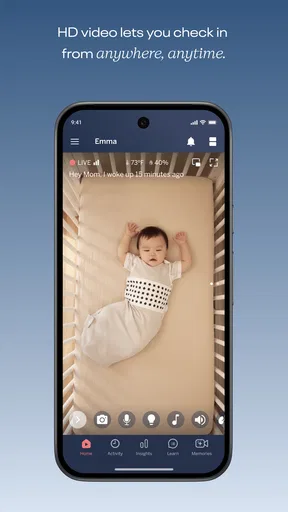
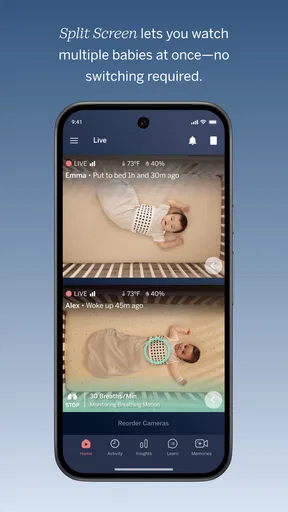
Now, let’s talk about what makes this app shine. One of the standout features is the real-time HD video streaming. You can see your baby clearly, whether it’s day or night, thanks to the night vision capability. Plus, the app provides sound and motion alerts, so you’re always in the know when your baby stirs or makes a peep.
In everyday use, alerts are most helpful when they prompt a quick check rather than replace one. A sound or motion notification can tell you something has changed, but it cannot make the decision about whether your baby needs you. I would tune notifications around the household’s sleep habits and avoid treating every alert as an emergency; otherwise, a tool meant to reduce uncertainty can become another source of interruptions.
A practical routine is to keep the phone somewhere you can hear it during a nap, then use the video when an alert gives you a reason to look. That avoids repeatedly opening the app just to reassure yourself, while still letting you check the room before walking in and potentially waking a sleeping child. If another caregiver is on duty, agree who is responding so two people do not both rush in—or assume the other person has handled it.
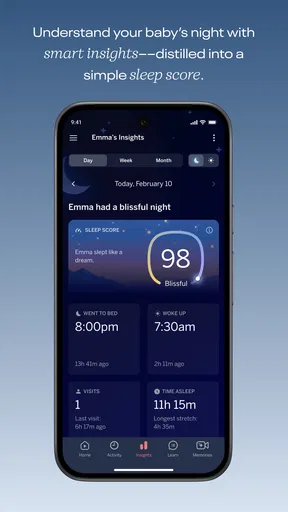
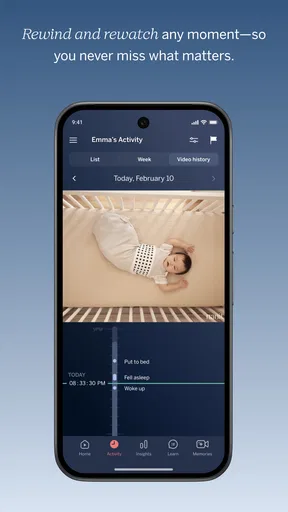
Another cool feature is the sleep insights. Nanit doesn’t just show you your baby; it helps you understand their sleep patterns. The app tracks and analyzes how your baby sleeps, offering personalized tips to improve their sleep quality—a lifesaver for those nights when you’re not catching enough Z’s yourself.
I would use those insights as a way to notice patterns, not as a scorecard or a substitute for your own judgement. A rough night can have an ordinary explanation, and no app can account for every change in a baby’s day. Looking at trends over time may be more useful than reacting to one restless stretch. If the numbers make you more anxious than informed, it is reasonable to focus on the monitor view and leave the analysis aside.
Where the system asks for a trade-off
The main compromise is commitment to a connected setup. A basic audio monitor or a simple camera can be enough for a parent who only wants to hear or see whether the baby is settled. Nanit is more appealing when you value its video, alerts and sleep information together; that broader approach also means more equipment and possible paid extras to consider. I would compare the full setup you need, not just the free download, before choosing it.
There is also a difference between useful information and useful action. Sleep summaries may help you spot a recurring routine, but they cannot tell you why a baby woke or guarantee that a suggested adjustment will work for your family. The app is at its best as an observation aid: it gives you a way to check and reflect, while decisions still belong to the caregiver. Parents who prefer not to track sleep may find those tools unnecessary rather than reassuring.
For a shared-care household, one small but worthwhile habit is to agree on a consistent response to alerts. For example, the person who is currently responsible can check the video first, while the other caregiver avoids duplicating the response. That turns notifications into a clearer handoff instead of a stream of messages and assumptions. It is a household workflow, not a special feature, but it can make a monitoring system feel much less intrusive.
Peace of Mind with Security
In today’s digital age, I know security is a big concern. Rest easy, because Nanit takes security seriously. The app uses encrypted security and two-factor authentication to protect your data and ensure that only you have access to your baby’s video feed. It’s like having your own little Fort Knox right in your nursery.
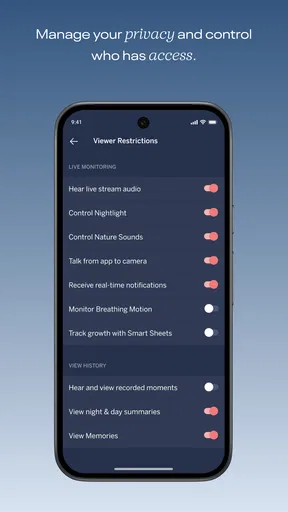
For me, security is not a one-time checkbox. I would use a strong, unique account password, enable the extra sign-in check, and be deliberate about who in the family gets access. That advice applies especially when several relatives help with childcare: convenience is valuable, but access should match the people who genuinely need to monitor the room. A connected camera is different from a monitor that stays entirely within the nursery, so comfort with an app-based feed is part of the decision.
Community and Additional Features
One thing I didn’t expect was the sense of community that comes with the Nanit Insights subscription. Parents can share and compare their baby’s sleep data with other users. It’s a neat way to feel connected and get advice from others who are in the same boat.
That social angle will not be for everyone. Comparing routines can make some parents feel supported, but it can also encourage unhelpful comparisons between babies whose needs and circumstances differ. I would treat shared experiences as conversation, not a benchmark for what your own child should be doing. If community features do not add value for you, the core reason to consider the app remains the monitoring workflow, not the social layer.
The app also integrates with Amazon Echo and Google Home, providing hands-free convenience. Imagine checking on your baby just by asking Alexa—pretty futuristic, right?
Voice control can be handy when your hands are full, but it should be an optional shortcut rather than the only way you check in. I would still keep the phone app familiar and accessible, especially if another caregiver does not use the same smart speaker. The best setup is the one every responsible adult in the home can operate confidently.
Who will get the most from it
I think this is strongest for parents who want a camera-led monitor and are genuinely interested in seeing sleep patterns alongside the live view. It can also make sense in a home where more than one caregiver takes turns, since a shared app-based routine can make checking in easier. The practical payoff is greatest when you will use the video and alerts regularly, and when sleep information feels helpful rather than burdensome.
I would skip it if you want an inexpensive, minimal monitor, do not want a connected camera in the nursery, or have no interest in sleep tracking. A conventional audio monitor may be the calmer choice for someone who only needs to hear a cry and wants fewer screens and settings. Likewise, if you are shopping for a camera that works independently of a particular baby-monitoring ecosystem, compare alternatives on that basis before committing.
One question parents often have is whether the app itself is enough. It is not: the monitoring features described here rely on the associated camera setup. Another is whether it costs nothing to use; the download is free, but in-app purchases can add substantial expense depending on what you choose. It is sensible to identify which capabilities matter to you and check the purchase details before budgeting for the complete system.
Final Thoughts
All in all, the Nanit app is more than just a baby monitor; it’s a comprehensive tool for new parents looking to ensure their little one is safe and sound. Its easy setup, robust features, and commitment to security make it a must-have for any nursery. Whether you’re a tech enthusiast or just a concerned parent, this app offers both peace of mind and practical utility.
My recommendation is more specific: consider it if you want video monitoring plus sleep insights and are comfortable with the hardware and paid options that can accompany them. I would not call it essential for every nursery, because a simpler monitor can do the job for families who want only basic sound or video. For the right household, though, having a clear way to check in and review routines can be genuinely useful.
If you’re interested in taking your baby monitoring to the next level, give it a shot. Trust me, it’s worth every penny for the peace of mind it delivers. Download links are readily available on their site, so go ahead and check it out!
Privacy and Permissions
See what permissions an app requests and how it handles your data.
- Location
- approximate location (network-based), precise location (GPS and network-based)
- Photos/Media/Files
- read the contents of your USB storage
- Storage
- read the contents of your USB storage
- Microphone
- record audio
- Wi-Fi connection information
- view Wi-Fi connections
- Other
- view network connections, pair with Bluetooth devices, access Bluetooth settings, allow Wi-Fi Multicast reception, connect and disconnect from Wi-Fi, disable your screen lock, control flashlight, full network access, change your audio settings, run at startup, control vibration, prevent device from sleeping
Verdict
Strengths of Nanit
- High-quality video streaming.
- Sleep tracking and analytics.
- Temperature and humidity sensors.
- Two-way audio communication.
- Easy setup and installation.
Limitations of Nanit
- Subscription required for advanced features.
- Limited offline functionality.
- Pricey compared to competitors.
- Occasional connectivity issues.
- Requires stable internet connection.
Other Releases by Nanit
View All
Nanit Sound and Light
Parenting3.4
Similar Picks in This Category
View All
Family Space
Motorola Mobility LLC.3.9

شرطة الأطفال - مكالمة وهمية
Oub Apps4.1

Findmykids: Parental Control
LETEM LTD4.6

Pregnancy + | Tracker App
Philips Electronics UK Limited4.8

Policía de niños - para padres
Kids police4.7

Pregnancy App
Amila4.9
Frequently Asked Questions
What features does the Nanit app offer for baby monitoring?
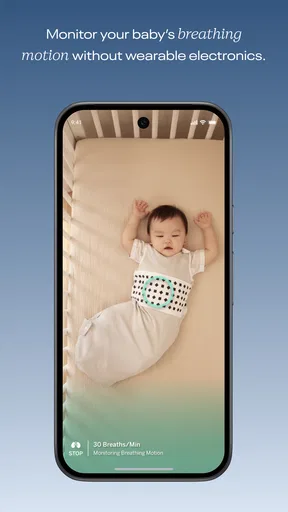
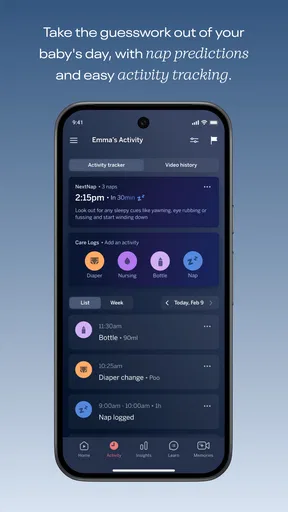
The Nanit app provides a comprehensive suite of features for baby monitoring, including sleep tracking, real-time HD video, and audio monitoring. It also offers sleep insights and tips based on your child's sleep patterns. Additionally, the app includes a breathing motion monitoring feature, ensuring your baby's safety while they sleep.
Is the Nanit app compatible with all devices?
The Nanit app is available for both Android and iOS devices, ensuring broad compatibility. However, it's important to check the specific device requirements and operating system version needed to ensure optimal performance. Regular updates may require the latest versions of the app and operating systems.
Does the Nanit app require a subscription for full access?
While the Nanit app offers basic features for free, a subscription is needed for access to advanced features such as detailed sleep analysis and historical data. The subscription model provides users with a more in-depth understanding of their child's sleep habits, making it a valuable tool for parents.
How secure is the Nanit app in terms of data privacy?
Security is a top priority for the Nanit app, which uses encryption to protect video, audio, and personal data. The app complies with industry-standard security protocols to ensure user privacy. It’s advisable to regularly update the app to benefit from the latest security enhancements.
Can multiple users access the Nanit app simultaneously?
Yes, the Nanit app allows multiple users to access the same account, enabling both parents and caregivers to monitor the baby. Each user can receive alerts and updates, making it convenient for shared caregiving responsibilities. User permissions can be managed within the app settings.
